

SAAS Medical Systems


Software as a Service Cloud Practice Management
Australian Medical Practice Management System
Full-Featured Cloud Medical Practice Management for Clinics, General Practitioners, Specialists, Allied Health and Ancillary Providers
Specialist Practice Features

Specialist Mode for Specific Functionality work-flow.
Change the Operating Mode - change the workflow.
You can immediately change the Operating Mode from General Practice to Specialist or other modes. The same software runs all modalities. For multi-modality clinics this is especially important.
Having separate workflows for General Practice and Specialist is especially helpful when billing for Medicare due to varying requirements such as Referrals for Specialists.
Both SAAS Web and SAAS Cloud Desktop have extensive capabilities for Medicare Online, and Medicare Easyclaim can be processed with the SAAS Web Tyro Easyclaim facility.
For Specialists - Medicare ECLIPSE is available for In-Patient Billing
SAAS Web and SAAS Cloud Desktop work together to provide a "pure web" (browser only) experience together with a managed desktop application that gives access to all your existing application, devices and printers.
The Doctor's Desk

One System - Dual Interface

SAAS Medical Systems provides a full-featured Cloud practice management system for General Practice.
You have the option of working entirely with the web application (SaaS Web) from any browser, or switching to the desktop version (SaaS Cloud Desktop) accessing the same Cloud database.
The functionality and the workflow is the same. No need to learn another system.
This unique feature provides unmatched versatility. When at home or on the move, you can work with SAAS Web. In the office, you can work with SAAS Desktop, which does provide some additional advantages for power users.
Front Desk - Patient Registration

Personal Details can be entered quickly and easily. "Tab through" assists with data entry.
Medicare, Health Care and DVA card details can be verified with Medicare Online.
Additional TABS allow Private Health Fund details, Referrals, Contacts, and Family Relationship groups to be entered.
The Front Desk provides single click access to all of the most common tasks performed by the Front Desk receptionist
Front Desk - Patient Billing

Patient Billing is designed for rapid, accurate data entry for simple and complex billing.
The Account Billing Type is set for operator Defaults that can be over-ridden).
The billing workflow will adapt to whichever billing type is being used (e.g. Private/Standard, Medicare/DVA Online Billing, Medicare Bulk or Batch billing etc.)
Item Types can be from your customised Quick-Pick, entered directly, or selected from a search list.
Practice Accounting Features

Within a Practice, if required, you have the ability to associate multiple Locations/Clinics and Divisions, and also multiple associated banking details in the case of partners or associates.
-
If required, Credit Note and Write-Off facilities are available
-
With Back-End Receipting, payments can be allocated over a number of invoices.
-
Medicare confirmed payments can automatically be receipted.
SAAS Desktop provides a single click export of all accounting reports to excel. Additionally, end-user reporting is available via SAAS Desktop
Medicare Online

Medicare Online capabilities available for Bulk Billing, DVA, and Patient Claims.
A number of additional features facilitating easy receipting and reconciliation of Medicare payments is also included.
You have the ability to perform Online Patient Verification, directly bill and claim at the same time, or batch claims at the end of day.
The Medicare Online functions incorporated into SAAS Medical Practice Management System are:-
-
Bulk Bill(DBS)
-
Department of Veterans Affairs Paperless Streamlined (DVA)
-
Patient Claims Interactive (PCI)
-
Patient Claims Store and Forward (PCS)
-
Online Patient Verification (OPV)
-
Online Concession Entitlement Verification (OCV)
-
Online Veteran Verification (OVV)
ECLIPSE Quote - Online Eligibility Check
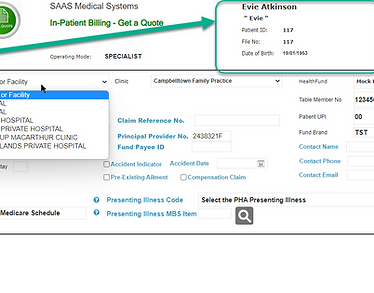
Provide cost information to patients prior to admission to hospital or treatment to facilitate Informed Financial Consent.
Provides patients with an estimate of the full cost of the episode of care from all relevant service providers, including how much of that cost the patient will be expected to pay out-of-pocket.
The ECLIPSE web service supports this process by indicating the benefit Medicare and/or their PHI will pay for identified services that can then be subtracted from the total cost to provide an indication of the patient’s out-of-pocket expenses.
Allows you to check the eligibility of a patient in relation to their Medicare and/or Private Health Insurer (PHI) status and obtain an estimate of out-of-pocket expenses relating to:
-
a hospital stay
-
prosthetic and miscellaneous services
-
Medicare Benefits Schedule (MBS) services
ECLIPSE Billing and Claiming
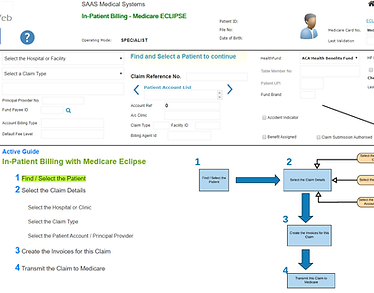
ECLIPSE - (Electronic Claim Lodgement and Information Processing Service Environment) is an extension of Medicare Online claiming. It offers a secure connection between:
-
Health Professionals
-
Public and Private hospitals
-
Billing Agents
-
Private Health insurers
-
Department of Veterans' Affairs
-
Medicare
It includes direct communication in the one transaction between your Practice, Medicare and Private Health Insurers.
ECLIPSE can be used for both paid and unpaid In-Patient Medical Claims and is lodged directly to Medicare with SAAS Web.
ECLIPSE Reporting and Receipting

The Medicare ECLIPSE Menu is where you access Medicare Processing Reports (IMC Reports) and ECLIPSE Remittance Advice Reports (ERA Reports - amounts paid to your account by the Health Funds).
1. IMC Reports (In-Patient Processing Reports) - present a list of IMC (In-Patient Medical Claims) and the current status of each claim.
2. ERA Reports (ECLIPSE Remittance Advice Reports) - present a list and the details of amounts paid.
When ERA's are retieved - each Remittance Advice then has to be reconciled with the originating IMC. The amount deposited to your bank account is Receipted and the Invoice Status is set the PAID.
Note that the entire process of lodgeing an In-Patient Claim - to receiving the Remittance Advice can take some time and depends on the Health Fund and their billing cycle.
Doctors Desk - Clinical System
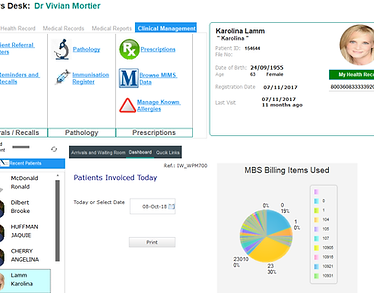
Access all Clinical functions from Doctors Desk.
including:
-
Patient Referral Letters
-
Reminders and Recalls
-
Pathology Requests and Results
-
Prescriptions
-
Patient Consultation Records
-
Patient Medical Reports and Approval
-
Report retrieval and Reprint Facility
-
Report Tracking
Quick Access to Arrivals and Waiting Room
Dashboard
Quick Links to Front Desk, waiting Room, Appointments, accounts, Medicare, and Administration functions
.
Prescriptions

SAAS Medical Systems is partnered with MIMS and eRx to provide a fully integrated Prescriptions module.
Quick access to Medicare and DVA records for the patient, and the ability to verify these online prior to issuing the prescription.
Drug Interactions and Allergy Alerts are included.
There is a complete Medications History.
Reprints (in case of printing error) as well as a facility to create a new script based on medication history.
Ability to cancel or modify eRx prescriptions already submitted.
Appointment Systems

Streamlined Appointments for SAAS Web and SAAS Desktop
-
Single click to change calendar view to Day / Week / Month View
-
Create appointments directly on the calendar. Options to check registration or create new registrations
-
Drag and Drop to Move or Extend Appointments
For Group Practices - Rosters and Scheduling
With SAAS Desktop - manage available of doctors within clinics for Appointments.
For Radiology - Booking System
Resource, equipment availability by Room.
This is an advance feature for SAAS Desktop available on request only.
Letter Writer / Templates

SAAS Medical Systems comes with a report editor (Microsoft Word is not required)
The Template Editor allows you to easily create your own Letter Templates with a drag-and-drop feature.
Include your own logos.
The Common Text feature enables you to create your own library of common text and boilerplate - which is then included to your letter with drag-and-drop.

SAAS Medical Systems can eliminate most of the complexities of running a Practice Management System. No Servers to take care of - all backups and updates to reference data (Medicare, MIMS Data, Clinical Coding Systems) can all managed for you.
Let us know who you are and we will provide more information about how to get started.

